open-clip-torch
Open reproduction of consastive language-image pretraining (CLIP) and related.
Description
OpenCLIP
[Paper] [Citations] [Clip Colab] [Coca Colab]

Welcome to an open source implementation of OpenAI's CLIP (Contrastive Language-Image Pre-training).
Using this codebase, we have trained several models on a variety of data sources and compute budgets, ranging from small-scale experiments to larger runs including models trained on datasets such as LAION-400M, LAION-2B and DataComp-1B. Many of our models and their scaling properties are studied in detail in the paper reproducible scaling laws for contrastive language-image learning. Some of the best models we've trained and their zero-shot ImageNet-1k accuracy are shown below, along with the ViT-L model trained by OpenAI and other state-of-the-art open source alternatives (all can be loaded via OpenCLIP). We provide more details about our full collection of pretrained models here, and zero-shot results for 38 datasets here.
| Model | Training data | Resolution | # of samples seen | ImageNet zero-shot acc. |
|---|---|---|---|---|
| ConvNext-Base | LAION-2B | 256px | 13B | 71.5% |
| ConvNext-Large | LAION-2B | 320px | 29B | 76.9% |
| ConvNext-XXLarge | LAION-2B | 256px | 34B | 79.5% |
| ViT-B-32-256 | DataComp-1B | 256px | 34B | 72.8% |
| ViT-B-16 | DataComp-1B | 224px | 13B | 73.5% |
| ViT-L-14 | LAION-2B | 224px | 32B | 75.3% |
| ViT-H-14 | LAION-2B | 224px | 32B | 78.0% |
| ViT-L-14 | DataComp-1B | 224px | 13B | 79.2% |
| ViT-bigG-14 | LAION-2B | 224px | 34B | 80.1% |
| ViT-L-14-quickgelu (Original CLIP) | WIT | 224px | 13B | 75.5% |
| ViT-SO400M-14-SigLIP (SigLIP) | WebLI | 224px | 45B | 82.0% |
| ViT-L-14 (DFN) | DFN-2B | 224px | 39B | 82.2% |
| ViT-L-16-256 (SigLIP2) | WebLI (multi-lang) | 256px | 40B | 82.5% |
| ViT-SO400M-14-SigLIP-384 (SigLIP) | WebLI | 384px | 45B | 83.1% |
| ViT-H-14-quickgelu (DFN) | DFN-5B | 224px | 39B | 83.4% |
| PE-Core-L-14-336 (PE) | MetaCLIP-5.4B | 336px | 58B | 83.5% |
| ViT-SO400M-16-SigLIP2-384 (SigLIP2) | WebLI (multi-lang) | 384px | 40B | 84.1% |
| ViT-H-14-378-quickgelu (DFN) | DFN-5B | 378px | 44B | 84.4% |
| ViT-gopt-16-SigLIP2-384 (SigLIP2) | WebLI (multi-lang) | 384px | 40B | 85.0% |
| PE-Core-bigG-14-448 (PE) | MetaCLIP-5.4B | 448px | 86B | 85.4% |
Model cards with additional model specific details can be found on the Hugging Face Hub under the OpenCLIP library tag: https://huggingface.co/models?library=open_clip.
If you found this repository useful, please consider citing. We welcome anyone to submit an issue or send an email if you have any other requests or suggestions.
Note that portions of src/open_clip/ modelling and tokenizer code are adaptations of OpenAI's official repository.
Approach
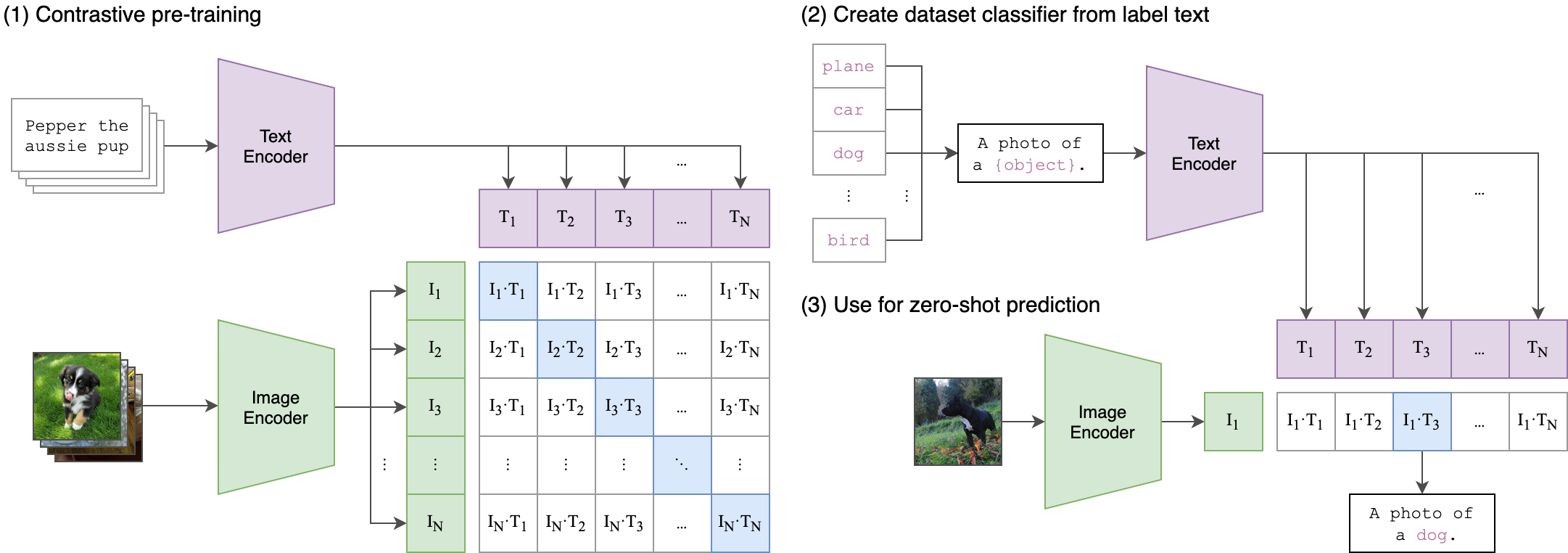 |
|---|
| Image Credit: https://github.com/openai/CLIP |
Usage
pip install open_clip_torch
import torch
from PIL import Image
import open_clip

model, _, preprocess = open_clip.create_model_and_transforms('ViT-B-32', pretrained='laion2b_s34b_b79k')
model.eval()  # model in train mode by default, impacts some models with BatchNorm or stochastic depth active
tokenizer = open_clip.get_tokenizer('ViT-B-32')

image = preprocess(Image.open("docs/CLIP.png")).unsqueeze(0)
text = tokenizer(["a diagram", "a dog", "a cat"])

with torch.no_grad(), torch.autocast("cuda"):
    image_features = model.encode_image(image)
    text_features = model.encode_text(text)
    image_features /= image_features.norm(dim=-1, keepdim=True)
    text_features /= text_features.norm(dim=-1, keepdim=True)

    text_probs = (100.0 * image_features @ text_features.T).softmax(dim=-1)

print("Label probs:", text_probs)  # prints: [[1., 0., 0.]]
If model uses timm image encoders (convnext, siglip, eva, etc) ensure the latest timm is installed. Upgrade timm if you see 'Unknown model' errors for the image encoder.
If model uses transformers tokenizers, ensure transformers is installed.
See also this [Clip Colab].
To compute billions of embeddings efficiently, you can use clip-retrieval which has openclip support.
Pretrained models
We offer a simple model interface to instantiate both pre-trained and untrained models. To see which pretrained models are available, use the following code snippet. More details about our pretrained models are available here.
>>> import open_clip
>>> open_clip.list_pretrained()
You can find more about the models we support (e.g. number of parameters, FLOPs) in this table.
NOTE: Many existing checkpoints use the QuickGELU activation from the original OpenAI models. This activation is actually less efficient than native torch.nn.GELU in recent versions of PyTorch. The model defaults are now nn.GELU, so one should use model definitions with -quickgelu postfix for the OpenCLIP pretrained weights. All OpenAI pretrained weights will always default to QuickGELU. One can also use the non -quickgelu model definitions with pretrained weights using QuickGELU but there will be an accuracy drop, for fine-tune that will likely vanish for longer runs.
Future trained models will use nn.GELU.
Loading models
Models can be loaded with open_clip.create_model_and_transforms, as shown in the example below. The model name and corresponding pretrained keys are compatible with the outputs of open_clip.list_pretrained().
The pretrained argument also accepts local paths, for example /path/to/my/b32.pt.
You can also load checkpoints from huggingface this way. To do so, download the open_clip_pytorch_model.bin file (for example, https://huggingface.co/laion/CLIP-ViT-L-14-DataComp.XL-s13B-b90K/tree/main), and use pretrained=/path/to/open_clip_pytorch_model.bin.
# pretrained also accepts local paths
model, _, preprocess = open_clip.create_model_and_transforms('ViT-B-32', pretrained='laion2b_s34b_b79k')
Fine-tuning on classification tasks
This repository is focused on training CLIP models. To fine-tune a trained zero-shot model on a downstream classification task such as ImageNet, please see our other repository: WiSE-FT. The WiSE-FT repository contains code for our paper on Robust Fine-tuning of Zero-shot Models, in which we introduce a technique for fine-tuning zero-shot models while preserving robustness under distribution shift.
Data
To download datasets as webdataset, we recommend img2dataset.
Conceptual Captions
YFCC and other datasets
In addition to specifying the training data via CSV files as mentioned above, our codebase also supports webdataset, which is recommended for larger scale datasets. The expected format is a series of .tar files. Each of these .tar files should contain two files for each training example, one for the image and one for the corresponding text. Both files should have the same name but different extensions. For instance, shard_001.tar could contain files such as abc.jpg and abc.txt. You can learn more about webdataset at https://github.com/webdataset/webdataset. We use .tar files with 1,000 data points each, which we create using tarp.
You can download the YFCC dataset from Multimedia Commons. Similar to OpenAI, we used a subset of YFCC to reach the aforementioned accuracy numbers. The indices of images in this subset are in OpenAI's CLIP repository.
Training CLIP
Install
We advise you first create a virtual environment with:
python3 -m venv .env
source .env/bin/activate
pip install -U pip
You can then install openclip for training with pip install 'open_clip_torch[training]'.
Development
If you want to make changes to contribute code, you can clone openclip then run make install in openclip folder (after creating a virtualenv)
Install pip PyTorch as per https://pytorch.org/get-started/locally/
You may run make install-training to install training deps
Testing
Test can be run with make install-test then make test
python -m pytest -x -s -v tests -k "training" to run a specific test
Running regression tests against